
Today and tomorrow
The kitchen view brings together upcoming plans, dinner, due tasks, a short handoff, and tomorrow's preparation. Week and month views provide a broader look at the calendar.
Self-initiated project - household software
Rowvyn's founder built a shared kitchen screen for his own household, with a phone companion for the people keeping it current. Daily plans, dinner, groceries, chores, and handoffs sit together where the family can see them.
The everyday problem
Knowing the next plan is only part of running a home. Someone also needs to handle dinner, the shopping list, and the handoff to tomorrow.
The project brought those needs into one kitchen view: upcoming plans, who's handling a ride, what's for dinner, and the small jobs that still need doing. A dedicated Android touchscreen gives the household a place to check without opening a phone.
Updates need to happen wherever the person is. The phone companion has its own editing layout, so changing a meal or adding groceries doesn't mean taking over the kitchen screen.
What the design needed to support
The software
The two interfaces share household data while giving each screen a clear job.
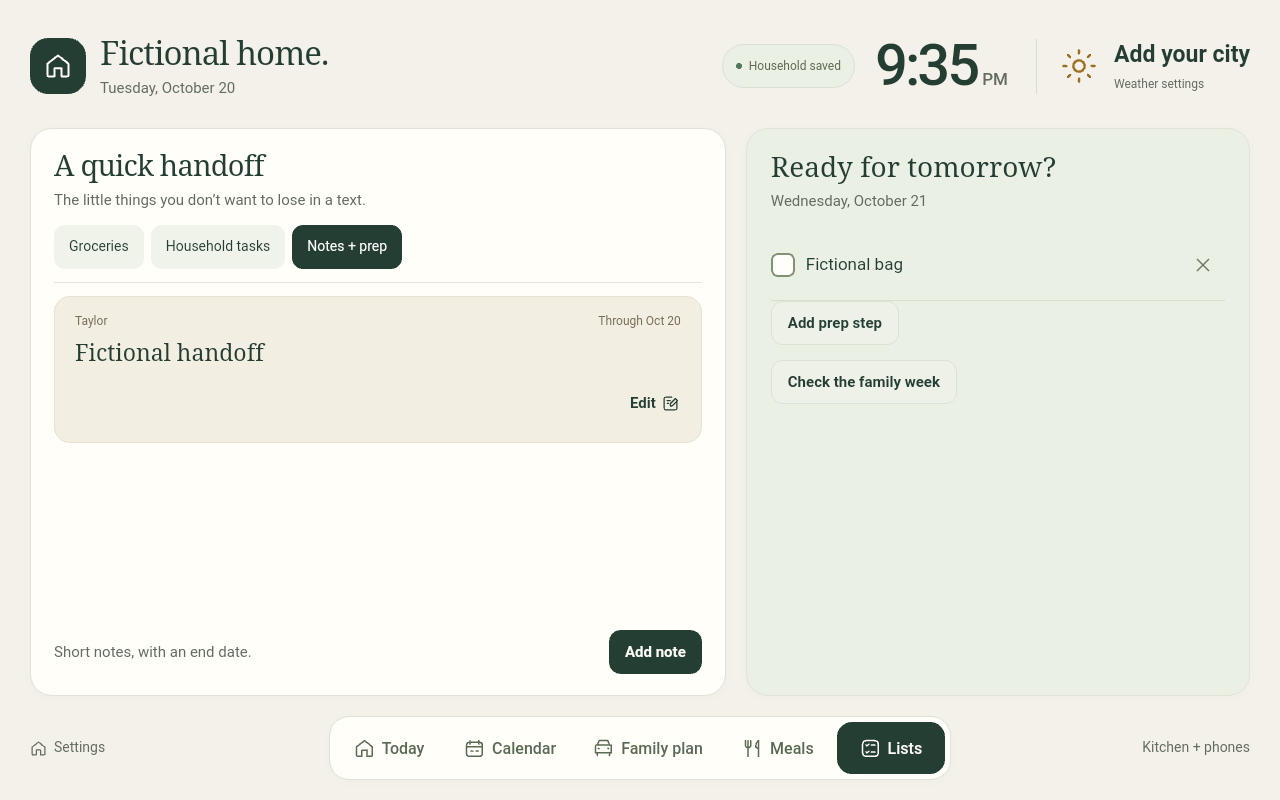
The kitchen view brings together upcoming plans, dinner, due tasks, a short handoff, and tomorrow's preparation. Week and month views provide a broader look at the calendar.
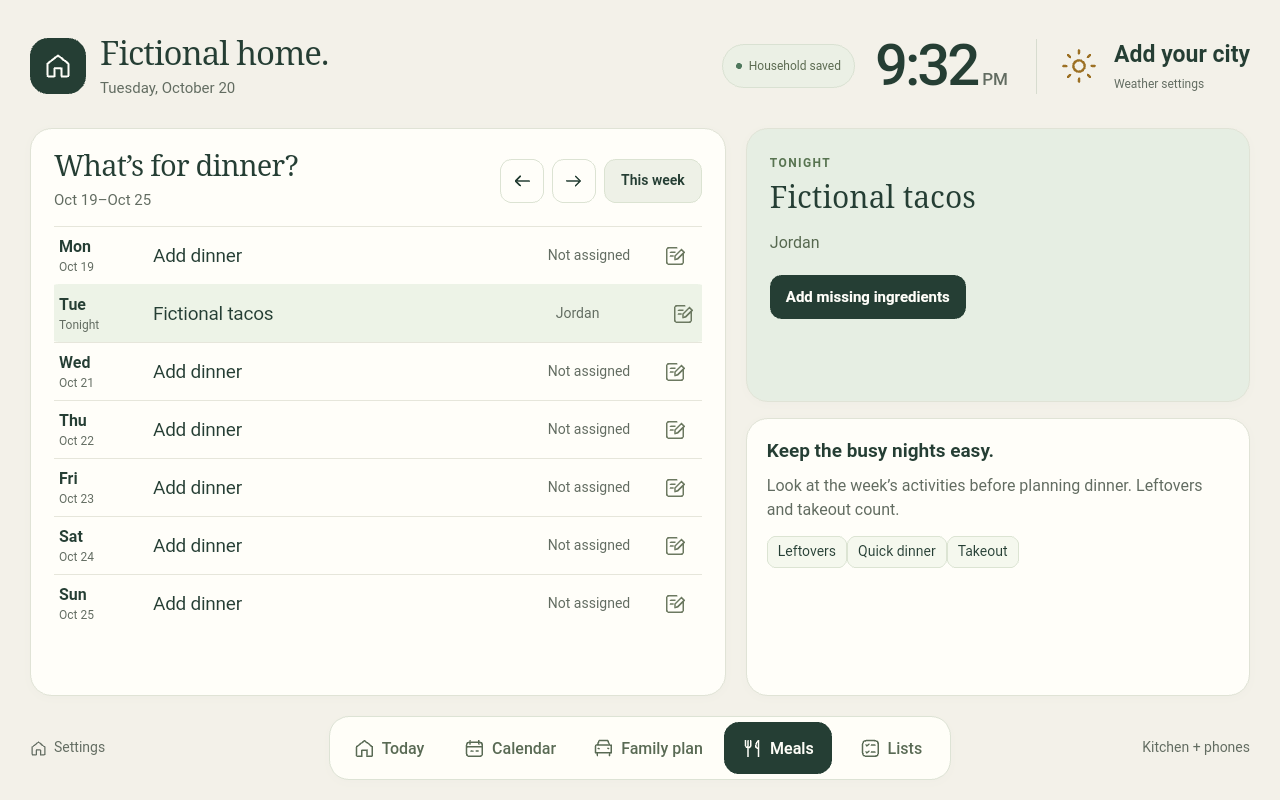
Assign dinner, add ingredients, and send missing items to the shared grocery list without duplicating items that are already waiting to be bought.
School drop-off and pickup, activity attendance, and rides there and home have separate assignments. Calendar events stay in the existing calendar app; the hub displays them alongside household plans.
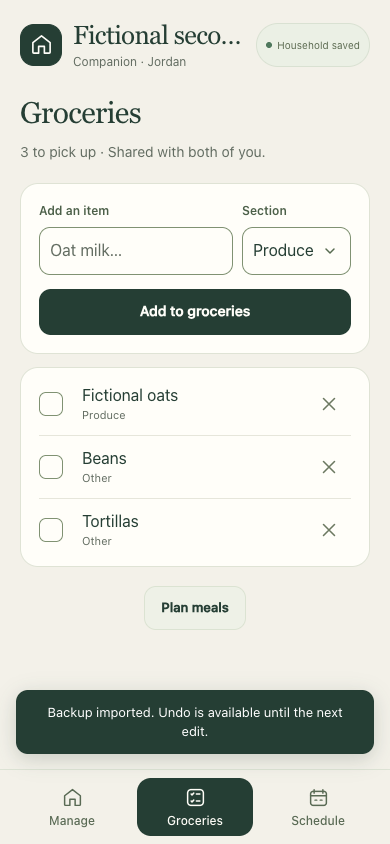
Manage plans, update chores and notes, and check off groceries from a phone. Saved changes feed the same household store used by the kitchen screen.
The interface
Reference-app previews from the released DIY guide, using fictional household content. These show the separate starter app, not private family screens or live calendar and weather results.
The build decisions
The kitchen screen favors a quick read. The phone favors small, deliberate updates.
The original household installation uses a Mac-hosted store shared by the Android display and phone companions. Focused editors, visible save feedback, and conflict handling keep one person's update from silently overwriting another's work.
The separate DIY starter app moves storage and the local phone server onto the Android display. A computer is needed for setup, then the powered display handles the local core. Phone editing in that version stays on trusted home Wi-Fi.
Implementation notes
What shipped
The original custom Home Hub is installed in the founder's home. This is a self-initiated project, with no client engagement or measured business outcome attached.
Build a Home Hub is a free download with optional tips. It includes a 59-lesson guide, an Android starter app, editable source, fictional examples, and backup and recovery instructions. Hardware and optional third-party services are separate.
The downloadable app is a simulation-reviewed DIY preview, with limited checks on one already-modified Android display and a basic real-phone edit. Fresh-stock installation, other display models, Windows/Linux execution, and independent beginner completion remain unverified. Optional live iCloud, Google Calendar, and weather connections remain unqualified.
Check compatibility before buying hardware. The starter app needs manual opening after a display reboot, and its phone editor uses unencrypted local HTTP on trusted home Wi-Fi. The working family installation doesn't establish compatibility or a complete beginner setup on another device.
Custom software for your business
Bring the shared view your team needs, the updates behind it, and the tools already in place. We'll help you work out what a useful custom tool should do.
[email protected]